

Products
- TOP
- Products
- DeviceXPlorer OPC Server
- SCADA Guide
- SCADA setting Wonderware (DDE/SuiteLink)
SCADA setting Wonderware (DDE/SuiteLink)
This page explains the settings for DeviceXPlorer when used with Wonderware InTouch using a DDE/SuiteLink connection. We are unable to answer questions concerning the SCADA settings, so please make inquiries to the SCADA vendor or sales outlet directly.
Configuring DeviceXPlorer
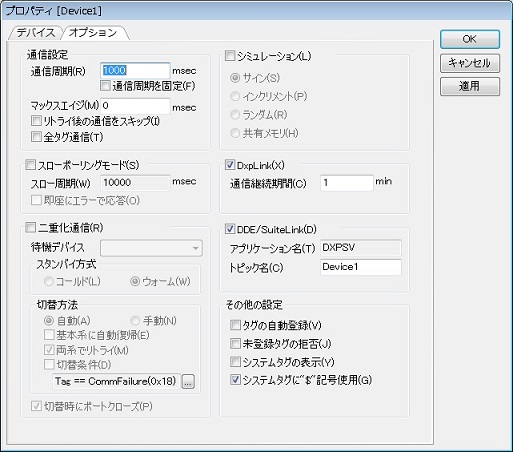
In order to access DeviceXPlorer from InTouch, create a new device in DeviceXPlorer and configure DDE/SuiteLink under Device Option.
Check "DDE/SuiteLink" in Device Option, and specify a Topic Name and Update Cycle. You can change the Application Name for DDE/SuiteLink in Tool Menu > Option.
Setting InTouch Access Name
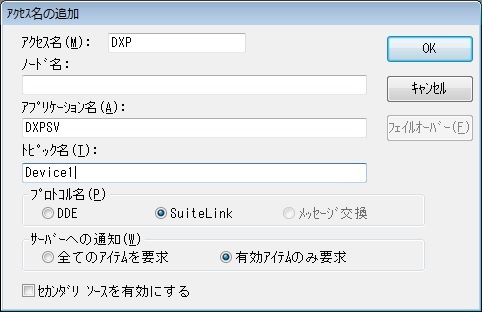
Configure an Access Name in InTouch WindowMaker. Select Access Name from the InTouch System menu, and add an access name.
Input the desired Access Name, and the same Application Name and Topic Name as in DeviceXPlorer.
Definition of InTouch Tag Name
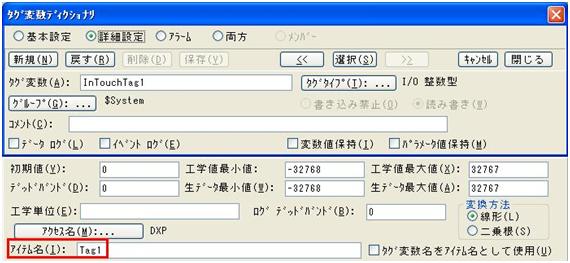
Input the configured Access Name, and input the same name as the Tag Name of DeviceXPlorer for Item Name. You can also specify dynamic-tag (direct PLC device name eg. M100, D123 etc)