

よくあるご質問
- DXPサーバー
スクリプト機能について
2025.05.16
スクリプト機能はデバイスエクスプローラ OPCサーバーにユーザー独自のロジックを組み込める機能で、バージョン7の全てのラインナップで追加費用なしで利用できます。スクリプト言語として「Lua」と呼ばれるスクリプト言語を採用しています。LuaのバージョンはLua 5.1で、Luaの基本的な情報については Lua 5.1 Reference Manual をご覧ください。
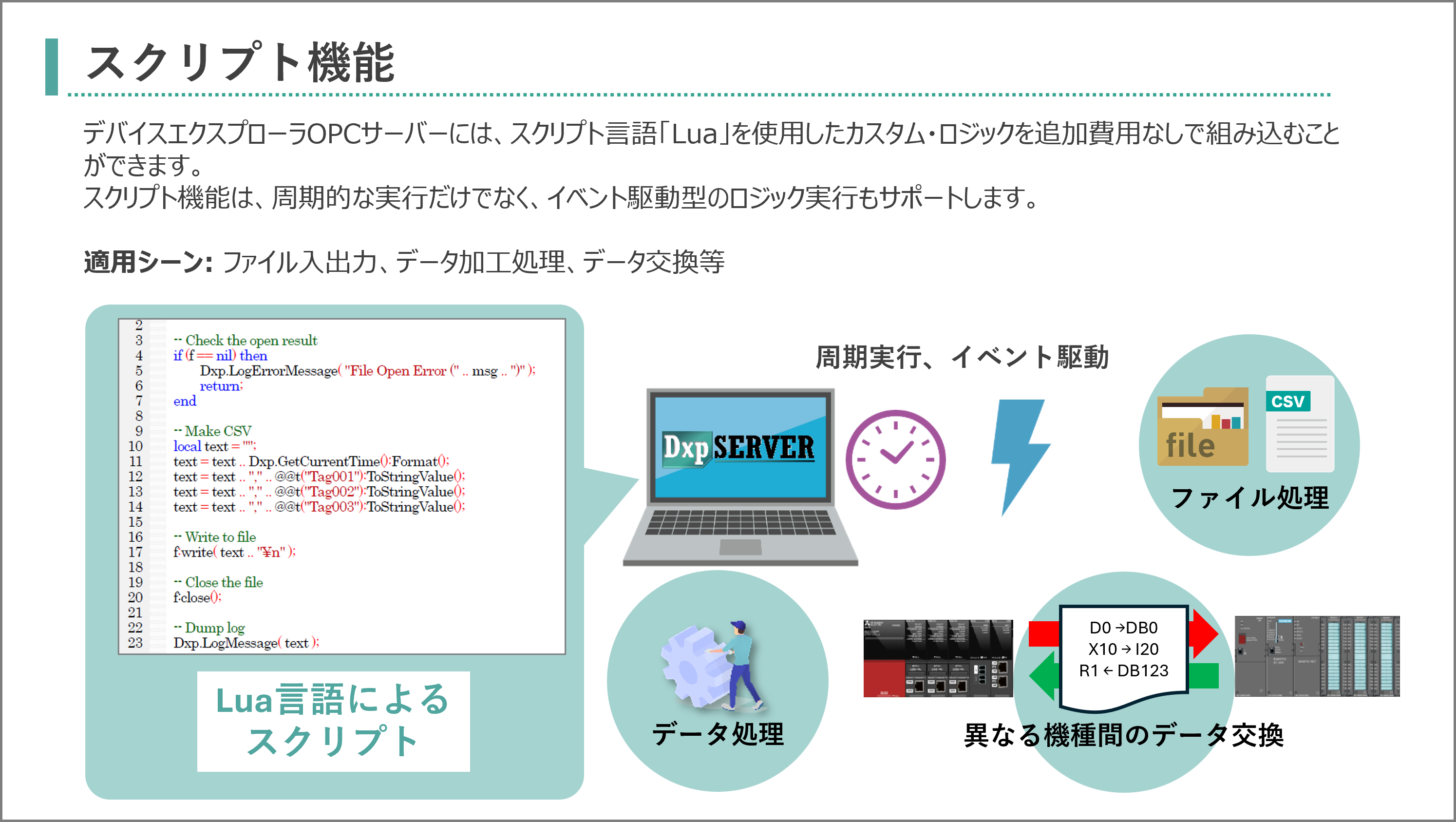
デバイスエクスプローラ OPCサーバー固有の機能詳細およびサンプルプログラムについては "ユーザーズガイド(サーバ本体編)"の [5 スクリプト]をご覧ください。"ユーザーズガイド(サーバ本体編)"は以下のリンクからダウンロード可能です。
Luaスクリプトのサンプルをいくつか紹介します。
- 値の処理と書き込み
- 複数の値を一括で書き込む
- 配列タグの各要素へのアクセス
- CSVファイルの読み取り
- CSVファイルへの書き込み
- 様々な値の生成
- バイトスワップ処理
- ワードスワップ処理
- Jsonフォーマットの処理
- Webサーバー (REST APIサーバー)に対するGETリクエストの送信処理
値の処理と書き込み
-- Retrieve data
local value1 = @t("Device001.IntTag001").Value;
local value2 = @t("Device001.IntTag002").Value;

-- Process data
local result = value1 * value2;

-- Write data
@t("Device001.ResultTag001").Value = result;
複数の値を一括で書き込む
local tags = {};
tags[1] = @t("SQL01.Timestamp:S");
tags[1].Value = Dxp.GetCurrentTime():Format('%Y-%m-%d %H:%M:%S');
tags[2] = @t("SQL01.Value01");
tags[2].Value = @t("Device1.IntTag001").Value;
tags[3] = @t("SQL01.Quality01");
tags[3].Value = @t("Device1.IntTag001").Quality;
tags[4] = @t("SQL01.Timestamp01");
tags[4].Value = @t("Device1.IntTag001").Timestamp:Format('%Y-%m-%d %H:%M:%S');

-- Sync write
local ret = Dxp.SyncWrite( tags );
if ret == false then
   Dxp.LogErrorMessage("Write Failure!");
end
配列タグの各要素へのアクセス
local arrayTag = @t("Device001.ArrayTag001");

-- Access each element of the array tag
local element01 = arrayTag:GetValue(1);
local element02 = arrayTag:GetValue(2);
local element03 = arrayTag:GetValue(3);
CSVファイルの読み取り
-- [Function] Read CSV format
function readCSV(filePath)
    local csvData = {};

    -- Open File
    local file = io.open(filePath, "r");
    if not file then
        Dxp.LogErrorMessage("Could not open file: " .. filePath);
        return nil;
    end

    for line in file:lines() do
        local row = {}
        for field in string.gmatch(line, "([^,]+)") do
            table.insert(row, field)
        end
        table.insert(csvData, row)
    end

    -- Close File
    file:close()

    return csvData
end

-- Read a CSV file
local csvFilePath = "C:\\\\Data\\test123.csv";
local data = readCSV(csvFilePath)

if data then
    for i, row in ipairs(data) do
    	local s = "";
        for j, field in ipairs(row) do
            s = s .. (field .. (j < #row and ", " or "\n"));
        end
        Dxp.LogErrorMessage(s);
    end
end
CSVファイルへの書き込み
-- File path
local path = "C:\\Data\\test_" .. Dxp.GetCurrentTime():Format("%Y%m%d") .. ".csv";
local f, msg = io.open(path,"a+");

-- Check the open result
if (f == nil) then
   Dxp.LogErrorMessage("File Open Error ("..msg..").");
   return;
end;

-- Make CSV
local text = "";
text = text .. Dxp.GetCurrentTime():Format();
text = text .. "," .. @t("Device1.IntTag001"):ToStringValue();
text = text .. "," .. @t("Device1.IntTag002"):ToStringValue();
text = text .. "," .. @t("Device1.IntTag003"):ToStringValue();

-- Write to file
f:write(text .. "\n");

-- Close the file
f:close();
様々な値の生成
-- Generate random value
@t("Device1.RandomTag001").Value = math.random(0,100);

-- Generate ramp value
if @t("Device1.ControlSwitch").Value == true then
   @t("Device1.IntTag001").Value = @t("Device1.IntTag001").Value + 1;
elseif @t("Device1.ResetSwitch").Value == true then
   @t("Device1.IntTag001").Value = 0;
else
   --nothing
end

-- Generate sine value
local angle = 5;
local rot = @t("Device1.Rot").Value;
rot= rot + angle;
@t("Device1.Rot").Value = rot;
local rad = rot * math.pi/ 180;
local SIN = math.sin(rad);
@t("Device1.FloatTag001").Value = SIN * 100;

-- Generate cos value
local COS = math.cos(rad);
@t("Device1.FloatTag002").Value = COS * 100;
バイトスワップ処理
-- [Function] Bit Shift Left
function bitShiftLeft(value, shift)
    return value * (2 ^ shift)
end

-- [Function] Bit Shift Right
function bitShiftRight(value, shift)
    return math.floor(value / (2 ^ shift))
end

-- [Function] Byte Swap for 16 bit integer
function byteSwap16(value)
    return bitShiftLeft(value % 256, 8) + bitShiftRight(value, 8)
end

-- [Function] Byte Swap for 32 bit integer
function byteSwap32(value)
    return
        bitShiftLeft(value % 256, 24) +
        bitShiftLeft(bitShiftRight(value, 8) % 256, 16) +
        bitShiftLeft(bitShiftRight(value, 16) % 256, 8) +
        bitShiftRight(value, 24)
end

-- Process 16 bit Byte Swapping
local original16 = 0x1234
local swapped16 = byteSwap16(original16)
Dxp.LogInfoMessage(string.format("Original 16bit: 0x%04X", original16))
Dxp.LogInfoMessage(string.format("Swapped 16bit: 0x%04X", swapped16))

-- Process 32 bit Byte Swapping
local original32 = 0x12345678
local swapped32 = byteSwap32(original32)
Dxp.LogInfoMessage(string.format("Original 32bit: 0x%08X", original32))
Dxp.LogInfoMessage(string.format("Swapped 32bit: 0x%08X", swapped32))
ワードスワップ処理
-- [Function] Process 32 bit Byte Swapping
function word_swap32(val)
    local lower = val % 0x10000
    local upper = math.floor(val / 0x10000)
    return lower * 0x10000 + upper
end

-- Process 32 bit Byte Swapping
local original32 = 0x12345678
local swapped32 = word_swap32(original32)
Dxp.LogInfoMessage(string.format("Original 32bit: 0x%08X", original32))
Dxp.LogInfoMessage(string.format("Swapped 32bit: 0x%08X", swapped32))
Jsonフォーマットの処理
-- Parse Json
local jsonObj = Dxp.ParseJson(json_text);

-- Get an array object
local json_array = jsonObj:GetObject("array1");

-- Get the element count from the array object
local element_count = 0;
while true do
    local ok, elem = pcall(function() return json_array:GetArrayObjectElement(count) end)
    if not ok or not elem then break end
    element_count = element_count+ 1;
end;

-- Get an element from the array object
local json_element = json_array:GetArrayObjecctElement(4);

-- Get numeric value
local id = json_element:GetNumeric("id");

-- Get string value
local name = json_element:GetString("name");

-- Get boolean value
local status = json_element:GetBoolean("status");
Webサーバー (REST APIサーバー)に対するGETリクエストの送信処理
事前に、HttpClitn01という名前のHTTPクライアント設定(ホストアドレス"jsonplaceholder.typicode.com"、ポート番号443)を作成しておく。
local http =@httpclient("HttpClient01");
local req = http:CreateRequest();
req.MethodType = "GET";
req.ContentType= "application/json";
req.QueryPath = "/posts";
req.InfiniteRetry = false;
local res = http:SendSync(req);

-- Check the response status and body
if res.StatusCode == 200 then
    -- Successfully received response
    local data=res.Body
    -- Get the response body
    Dxp.LogInfoMessage("Data received: ".. data);

    -- Json Parse
    local jsonObj = Dxp.ParseJson(data);

    --Get an element
    local jsonelement = jsonObj:GetArrayObjectElement(0);
    Dxp.LogInfoMessage("Element[0]: ".. jsonelement:ToString());

    -- Get "userId"
    local userId = jsonelement:GetNumeric("userId");
    Dxp.LogInfoMessage("userId: ".. userId);

    -- Get "title"
    local title = jsonelement:GetString("title");
    Dxp.LogInfoMessage("title: ".. title);
else
    Dxp.LogErrorMessage("Failed to get data. Status Code:"..res.StatusCode);
end