

FAQ
- TOP
- FAQ
- [Ver.7]“Failed to load settings from runtime” / “Failed to write settings to runtime” error is displayed
- DeviceXPlorer
[Ver.7]“Failed to load settings from runtime” / “Failed to write settings to runtime” error is displayed
2026.02.04
Phenomenon
This message may be displayed when starting the DeviceXPlorer OPC Server.
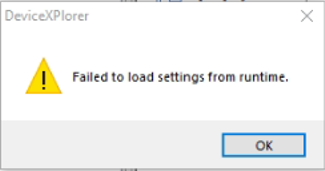
Cause
The issue is caused by communication being blocked between the configuration tool and the runtime.
The communication may be blocked due to one of the following reasons:
- The runtime is not running
- Proxy settings
- Security software or firewall restrictions
Solution
- Please check whether the runtime (DeviceXPlorer OPC Server Runtime) is running in the [Processes] tab of Task Manager.
- For detailed information about proxy settings and how to address them, please refer to the article below.
Unable to communicate between processes of the Device Explorer OPC Server