

FAQ
- DeviceXPlorer
[For Ver.7] How to Enable the OPC UA Server
2025.12.09
The OPC UA server function in DeviceXPlorer OPC Server Ver.7 is disabled by default, so it must be enabled beforehand.
Enabling OPC UA Server
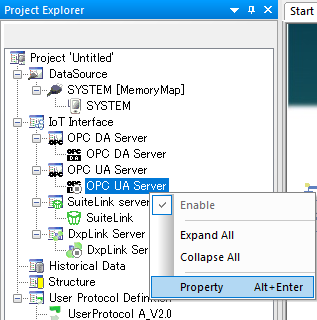
From Project Explorer, go to “External System Integration”, right-click on “OPC UA Server”, and select “Properties” to configure the OPC UA server settings.
• Check “Use OPC UA Server” and apply the settings to enable the OPC UA server function.
• Configure the Security Policy and Security Mode according to your security requirements.
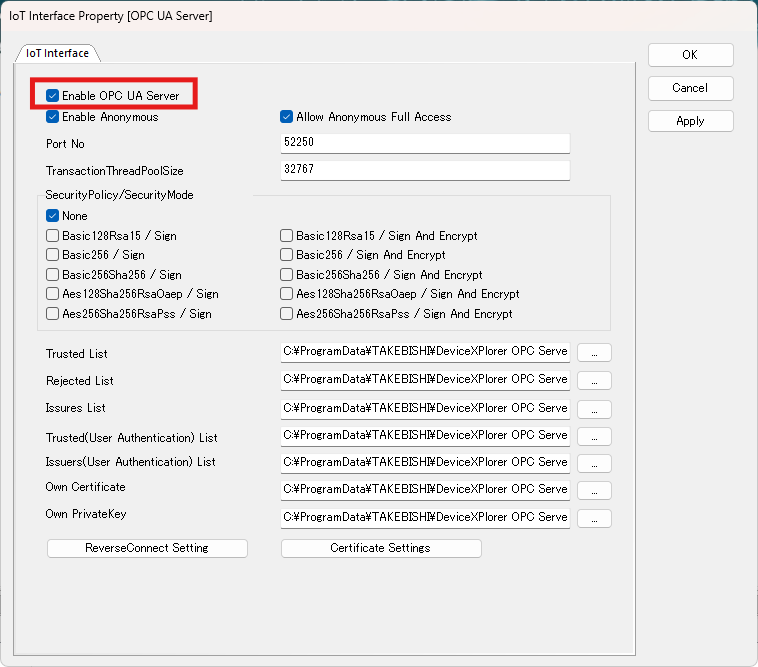
*For details on other configuration items, please refer to the manual [User’s Guide (Server Edition)].