

Products
PLC Setting
SYSMAC-CJ series Ethernet configuration
Configure Ethernet paramters such as IP address, Port number etc. by Parameter window
Network environment
This sample assume the following cases.
* You can scroll this table sideways.
| Host IP address | 192.168.1.1 |
|---|---|
| Host Port number | 0 |
| PLC IP address | 192.168.1.2 |
| PLC Port number | 9600 |
IP address and Port number
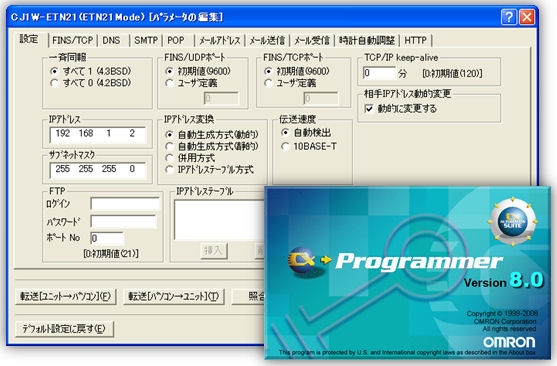
Explanation
- Open "Ethernet Unit" in CX Programmer, and configure "192.168.1.2" as IP address.
- Port number of both TCP and UDP are set to “9600” by default. Change the Port No. as needed.
NOTE:Usage of FINS/TCP
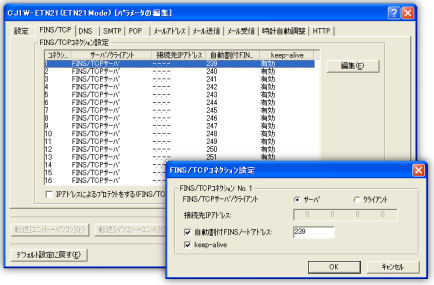
Explanation
- It is necessary to make "Keep-Alive" and FINS node address enable in TCP/IP.
- TCP/IP port number is configured 239-254 as default.
Configuration of Network number
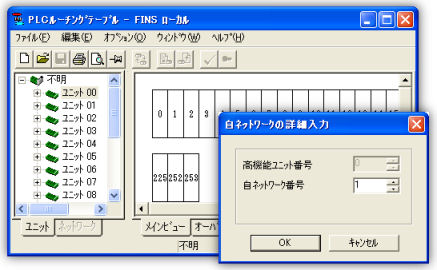
Network number
Routing table is a table to request the communication route of the FINS message when the FINS communication service is used.
Right-click on Unit No. of the interface unit (which is set with the rotary switches on the front), and select "Insert CPU SIOU". Input the Network number that doesn't overlap.
Explanation
- You specify "Network No" for communication parameters by "Device setting" of the DeviceXPlorer.
- The network unit can specify "0" for a network number in case of one kind of.
Configuration of Node No. and Unit No.
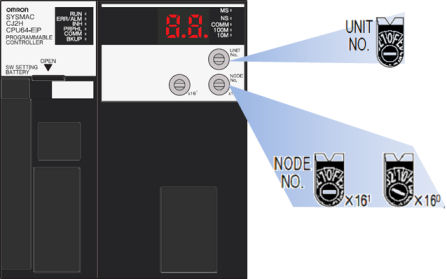
Node No.
Node No. identifies each Ethernet Unit when multiple Ethernet Units are connected in the same LAN. Configure the Node No. switches on the back within ranges from 01 to FE in hexadecimal (1 ~ 254 in decimal). Be careful not to overlap with Node No. of other Ethernet Unit in the same LAN.
Unit No.
Unit No. identifies the CPU Advanced Unit attached to the CPU Unit. Set the rotary switch "Unit No." on the front of the Ethernet Unit within the range from 0 to F. Be careful not to overlap with Unit No. of other CPU Advanced Unit attached to the same CPU Unit.
Explanation
- You specify "Node No." and "Unit No." for communication parameters by "Device setting" of the DeviceXPlorer.
- MITSUBISHI MELSEC
- OMRON SYSMAC
- JTEKT TOYOPUC
- YOKOGAWA FA-M3
- HITACHI HIDIC
- SHARP SATELLITE
- FUJI MICREX
- PANASONIC FP
- YASKAWA MP
- KEYENCE KV
- TOSHIBA PLC
- AZBIL CPL
- IAI CONTROLLER
- ROCKWELL AB
- SIEMENS SIMATIC
- CODESYS PLC
- GE PLC
- Saia PLC
- LSIS XGT
- MODBUS
- FANUC CNC
- MITSUBISHI CNC
- MITSUBISHI EDM
- KAWASAKI ROBOT
- YASKAWA ROBOT
- SEIKO EPSON ROBOT
- YAMAHA ROBOT
- SHIBAURA MACHINE
- Sumitomo Heavy Industries - Molding Machine
- The Japan Steel Works - Molding Machine
- DPRNT
- MTConnect
- BACnet
- EtherNet/IP
- MITSUBISHI RFID
- OMRON RFID
- JCC AE sensor
- COGNEX BCR
- KEYENCE BCR
- MARS TOHKEN BCR
- MITSUBISHI ECO
- IEC61850 MMS Client
- IEC60870-5-104
- DNP3
- OPC DA CLIENT
- OPC UA CLIENT
- OPC UA SUBSCRIBER
- ODBC CLIENT
- DDE CLIENT
- DxpLink CLIENT
- Modbus/TCP Server
- User Protocols
- SHARED MEMORY