

Products
- TOP
- Products
- DeviceXPlorer OPC Server
- SCADA Guide
- SCADA setting Wonderware InTouch(OPCLink)
SCADA setting Wonderware InTouch(OPCLink)
This page is an introduction for setting when OPC Server is used with OPCLink in "InTouch 8.1" of Wonderware. We are unable to answer details concerning setting of SCADA, so please make inquiries to the SCADA vendor or the sales outlets.
How to Install OPCLink

It is necessary to install "OPCLink" : gateway driver that converts the protocol of DDE/SuiteLink and OPC in order to InTouch access to OPC Server. OPCLink is stored in CD written as "Device Integration Products" of the FactorySuite product. Select "I/O Servers" and install "OPCLink" when the installer starts.
How to Start OPCLink
Select Program->Wonderware FactorySuite->I/O Servers-> OPCLink from Start Menu and activate OPCLink.
Setting of Topic
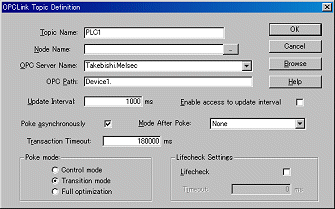
Start "Topic Definition" from "Configure" menu of OPCLink, and set the following four main items.
Set other items properly. It is no problem to remain default.
- [Topic Name] Specify a Topic Name of DDE.
- [Node Nam] Specify a Node Name that OPC Server works. It is possible to omit it when operating on same PC.
- [OPC Server Name] Select ProgID of OPC Server from drop down list.
- [OPC Path] Specify "Device Name" of OPC Server, and add "." (dot) to the tail.
Now the setting of OPCLink is completed. OPCLink is left started before InTouch Viewer is executed.
Even if OPC Server doesn't start, it will stand up automatically according to the demand from OPC Client.
Definition of InTouch Access Name
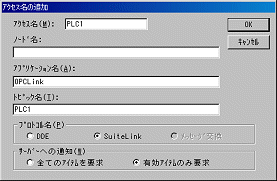
Select "Access Name" from "System" menu of InTouch. The screen in figure below opens when you click "Addition", so define an access name for OPC.
- [Access Name] Specify an arbitrary name defined in InTouch.
- [Application Name] Input "OPCLink".
- [Topic Name] Specify a topic name defined in OPCLink.
- [Protocol] Select "DDE" or "SuiteLink".
Definition of InTouch Tag Name
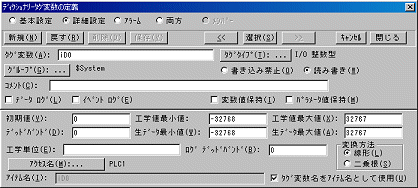
Specify a tag name accessed OPCLink from InTouch.
- [Tag Name] Specify a tag name like "i" + a PLC Device Name + a PLC Device Number.
- [Tag Type] If the tag type is integer, specify "I/O Integer".
- [Access Name] Specify the access name which is defined to connect to OPCLink.
Execution

When InTouch is executed, it can be confirmed to acquire a value and a quality flag from the OPC Server normally. Moreover, one tag is registered in the topic "PLC1" on the screen of OPCLink, and it can be confirmed to communicate normally.