

Products
- TOP
- Products
- DeviceXPlorer OPC Server
- SCADA Guide
- SCADA setting ASTMAC R5(Object Builder)
SCADA setting ASTMAC R5(Object Builder)
It introduces the setting when our OPC Server is used with "ASTMAC R5.x" of Yokogawa Electric. Our company doesn't answer details concerning the setting of SCADA, so please get the inquiry in the SCADA vendor or the shop.
How to Start ASTMAC Object Builder
Select Program->YOKOGAWA ASTMAC VDS->Development Builder->Object Builder from Start Menu. Object Builder is started.
How to Add I/O Object
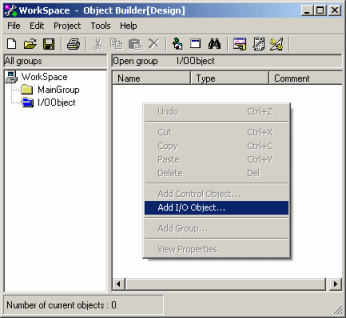
When you select "I/O Object" and click right button in the main view, the pop up menu is displayed. Select "Add I/O Object".
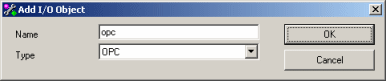
Select "OPC" from the drop down list of "Type" and input an arbitrary object name to "Name".
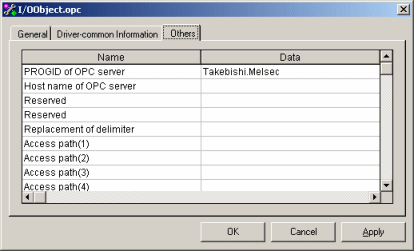
Input Prog.ID of Our OPC Server in "ProgID of OPC Server" of Tab "Besides".
How to Register Control Object
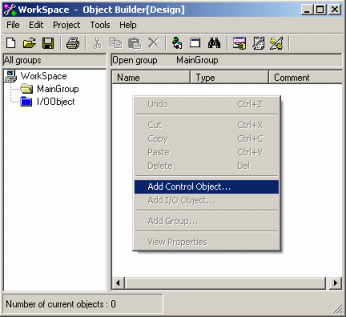
When you select "MainGroup" and click right button in the main view, the pop up menu is displayed. Select "Add Control Object".
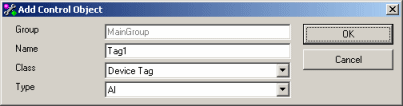
If you use the analog input tag, select "AI" to "Type" and input an arbitrary tag name to "Name".
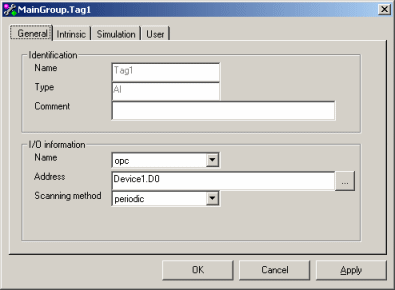
Select the I/O object, which is set as mentioned above, at "Name" of I/O Information in Tab "Whole". Input device name and tag name of OPC Server to "Address". For instance, when you define "Device1" as device name and define "D0" as tag name in the OPC Server, address becomes "Device1.D0".
How to Change Mode
When you change "Mode of Object Builder" to "Debug" or "Run time", it is completed.
When you select "Viewer" in "Tool" menu of Object Builder, you can monitor the value.
How to Execute Graphic Builder
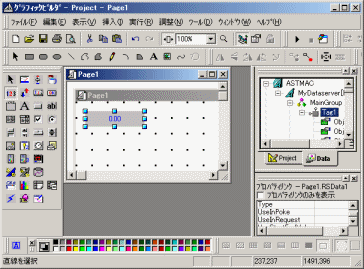
When you click the "Data" tab in the upper right of Graphic Builder, the tag information that is registered in the data server is displayed.
For instance, when you allocates "Monitor Value" of Tag Object, drag and drops "CV" from the tree to an arbitrary object.