

Products
- TOP
- Products
- DeviceXPlorer OPC Server
- SCADA Guide
- SCADA setting Wonderware (DDE/SuiteLink)
SCADA setting Wonderware (DDE/SuiteLink)
This page is the introduction for the setting when DeviceXPlorer is used with DDE/SuiteLnk in "InTouch" of Wonderware. We are unable to answer details concerning the setting of SCADA, so please make inquiries to the SCADA vendor or the sales outlets.
Configuration of DeviceXPlorer
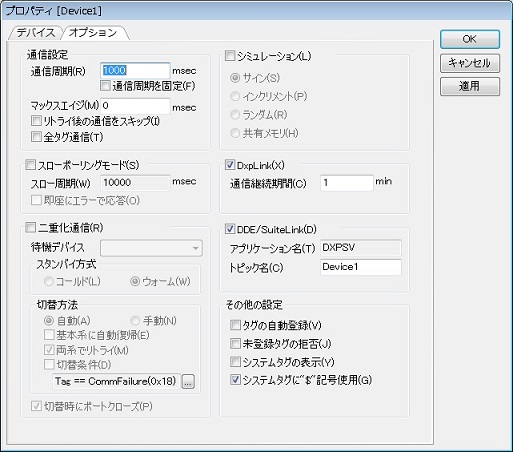
After creating a Device in DeviceXPlorer in order to access DeviceXPlorer and configure DDE/SuiteLink in Device Option.
Check "DDE/SuiteLink" in Device Option, and specify a Topic Name and Updating cycle. You can change Application Name for DDE/SuiteLink in Tool Menu->Option.
Setting of InTouch Access Name
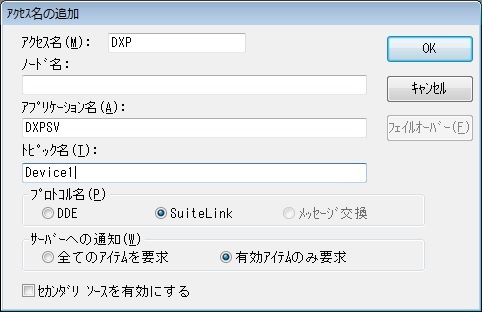
Configure an Access Name in WindowMaker of InTouch. Select "Access Name" from "System" menu of InTouch, and add an access name.
Input arbitrary Access Name, and same Application and Topic Name as DeviceXPlorer.
Definition of InTouch Tag Name
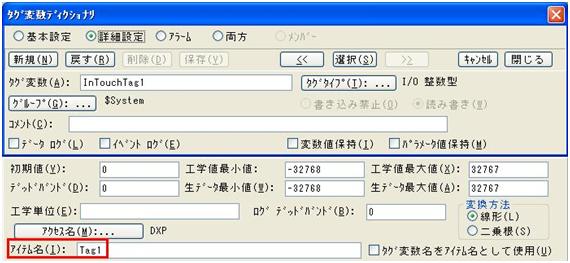
Specify the above-setting access name, and input the same name as the Tag Name of DeviceXPlorer to Item Name. You can specify dynamic-tag( direct PLC device name eg. M100, D123 etc)