

Products
PLC Setting
MELSEC-Q series Ethernet configuration
Ethernet parameters of IP address and the port number, etc. are set on the PC parameter screen of GX Works.
Network environment
This sample assume the following cases.
| Host IP address | 192.168.0.1 |
|---|---|
| Host Port number | 0 |
| MELSEC IP address | 192.168.0.4 |
| MELSEC Port number | 1025 |
PC parameter
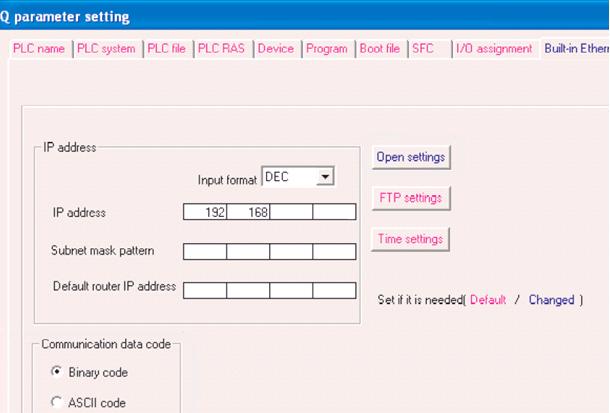
Explanation
- You open the "Q parameter setting" of GX Works2, and "Built-in Ethernet port" tab is selected.
[Caution] Built-in Ethernet a port has the following restriction on PLC side.
- Automatic opening UDP port (the 5000th) cannot be used.
- Block Access Command cannot be used.
- It is impossible to access CPU on another station in a multiple CPU system.
- It is impossible to access CPU on another station via a network (MELSECNET).
- It is impossible to access Random access buffer.
- It is impossible to access buffer memory of the intelligent function module.
- It is impossible to use Q4E frame and A1E frame.
- In using TCP/IP, Existence Confirmation will be done 9 times for 5 seconds.
It is necessary to configure the "Q parameter setting" as follows.
Network environment
This sample assume the following cases.
| IP address | 192.168.0.4 |
|---|---|
| Communication Data code | Binary data code |
| Enable Write at RUN time | Checked |
PC parameter
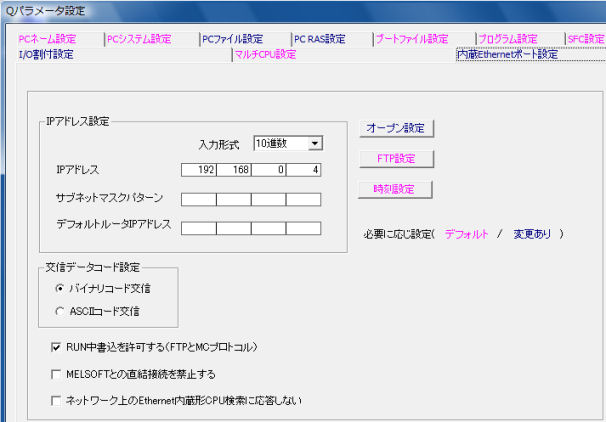
Explanation
- OPC Server doesn't support ASCII code communication.
- Please check "Enable Write at RUN time", if you can write to PLC device from outside(OPC Server).
You push the "Open settings" button, open "Built-in Ethernet port open setting", it is necessary to configure "Protocol" and "Port No".
Sample setting
| Port1025 (0x401) | TCP(Unpassive) |
|---|---|
| Port1026 (0x402) | UDP |
PC parameter
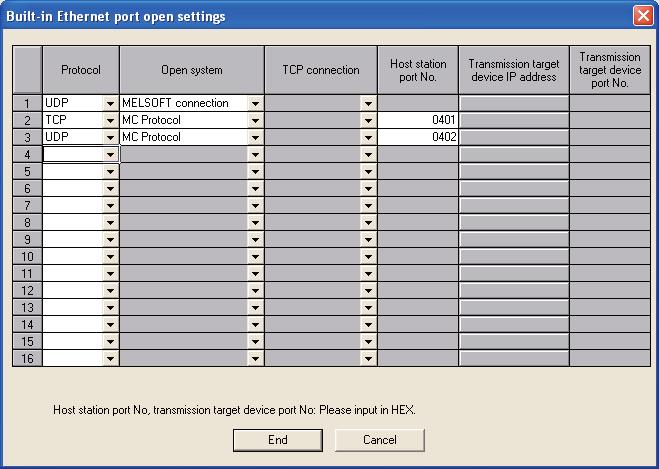
Explanation
- Please input Port No by hex digit format.
- It is necessary to configure the open setting , because an automatic open UDP/IP port (5000) can't use.
- It is necessary to configure "MELSEFT Connection" at least one port, if you'd like to access by iQWorks.
MELSEC-Q series Ethernet configuration
It is possible to set by using the parameter screen of GX Works in the MELSEC-Q series though it was necessary to set Ethernet parameters of IP address and the port number, etc. by the ladder program in the MELSEC-A series.
Network environment
This sample assume the following cases.
| Host IP address | 192.168.0.1 |
|---|---|
| Host Port number | 0 |
| MELSEC IP address | 192.168.0.4 |
| MELSEC Port number | 1025 |
Network parameter
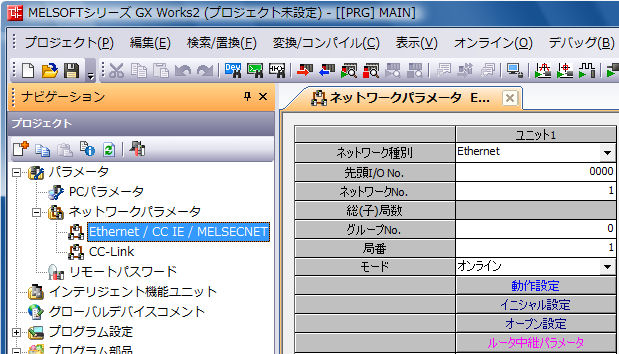
Explanation
- Open the "Network Parameter" screen, and you configure Network type Settings is "Ethernet". If you install "QJ71E71" to slot 0(beside CPU), you configure the Ethernet unit Starting I/O No. is “0” and the Network No. is “1”,Group No. is "0", Station No. is "1".
You push the "Operation setting" button, open "Ethernet operation".It is necessary to configure the "Ethernet operations" as follow.
Sample setting
| IP address | "192.168.0.4"(DEC.) |
|---|---|
| Communication data code | Binary code |
| Initial timing | Always wait for OPEN |
| Enable Write at RUN time | Checked |
| Send fram setting | Ethernet(V2.0) |
| TCP Existence confirmation setting | Use the keepAlive. |
Ethernet operations
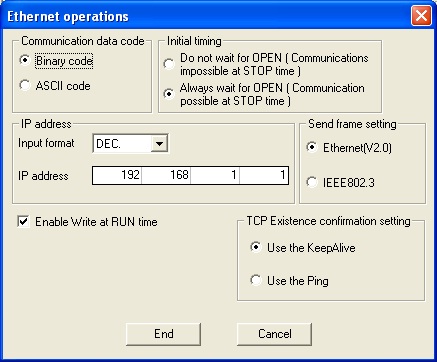
Explanation
- OPC Server doesn't support ASCII code communication. If you share a software which supports only ASCII code as like MX-Component, please use an automatic open UDP/IP port.
- Please check "Enable Write at RUN time", if you can write to PLC device from outside(OPC Server).
- Existence confirmation setting by PING is to send ICMP packet, Existence confirmation setting by KeepAlive is to send ACK packet. It may become to impossible to reconnect PLC without PLC's reset,if you select the existence confirmation setting by PING.
- The use of the Keep Alive function to perform existence checks is recommended when the Q Series is used. Ethernet units that have serial numbers with 05051 or later as the upper five digits and function version B or later can use this function.For other models, use Ping.
You push the "Initial setting" button of Network parameter screen. It is necessary to configure the "Initial setting" as follow.
Sample setting
| Destination existence conformation starting interval | 20(×500ms) |
|---|---|
| Destination existence conformation interval timer | 10(×500ms) |
| Destination existence conformation resend | 3(times) |
*The existence confirmation processing will be performed 3 times at 10 seconds intervals after communication has been stopped for 5 seconds.
*The default value "10 minutes" means that it is impossible to communicate for 10 minutes after communication has been stopped.
Initial setting

Explanation
- If the communication trouble occurs by the cable determination or the influence of the collision, etc, OPC Server becomes time-out error when it can't receive the response from PLC in the set time. OPC Server can't communicate though it retries to communicate for the set times , and OPC Server tries to reconnect after it closes the connection. At this time, it is not possible to be reconnected be not of Ethernet (The port is in the state of the unclose) it of the unit in the state of LISN, and set the living confirmation parameter appropriately, please.
You push the "Open settings" of Network parameter screen. It is necessary to configure the "Initial setting" as right.
Sample setting
| Port1025 (0x401) | UDP |
|---|---|
| Port1026 (0x402) | TCP(Unpassive) |
| Port1027 (0x403) | TCP(Fullpassive) |
Open settings

Explanation
- Please select "Procedure exist" at Fixed buffer communication procedure.
- Please input Port No by hex digit format.
- Please select "Confirm" at Existence confirmation.
- It it not neccessary to configure Open settings if you use an automatic open UDP/IP port(5000).
- MITSUBISHI MELSEC
- OMRON SYSMAC
- JTEKT TOYOPUC
- YOKOGAWA FA-M3
- HITACHI HIDIC
- SHARP SATELLITE
- FUJI MICREX
- PANASONIC FP
- YASKAWA MP
- KEYENCE KV
- TOSHIBA PLC
- AZBIL CPL
- IAI CONTROLLER
- ROCKWELL AB
- SIEMENS SIMATIC
- CODESYS PLC
- GE PLC
- Saia PLC
- LSIS XGT
- MODBUS
- FANUC CNC
- MITSUBISHI CNC
- MITSUBISHI EDM
- KAWASAKI ROBOT
- YASKAWA ROBOT
- SEIKO EPSON ROBOT
- YAMAHA ROBOT
- SHIBAURA MACHINE
- Sumitomo Heavy Industries - Molding Machine
- The Japan Steel Works - Molding Machine
- DPRNT
- MTConnect
- BACnet
- EtherNet/IP
- MITSUBISHI RFID
- OMRON RFID
- JCC AE sensor
- COGNEX BCR
- KEYENCE BCR
- MARS TOHKEN BCR
- MITSUBISHI ECO
- IEC61850 MMS Client
- IEC60870-5-104
- DNP3
- OPC DA CLIENT
- OPC UA CLIENT
- OPC UA SUBSCRIBER
- ODBC CLIENT
- DDE CLIENT
- DxpLink CLIENT
- Modbus/TCP Server
- User Protocols
- SHARED MEMORY