

Products
- TOP
- Products
- DeviceXPlorer OPC Server
- Support Devices
- HITACHI Industral Equipment Systems /HITACHI HIDIC
- PLC Setting
PLC Setting
HIDIC EH150 series setting
Ethernet parameters are made using WEB browser. Open set up pages from WEB browser by specifying IP address of the Ethernet unit.
Network environment
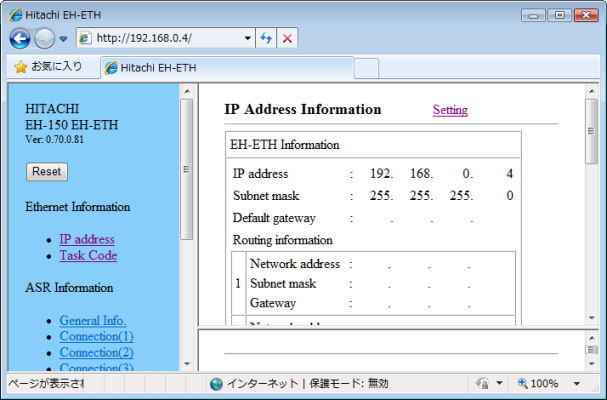
This sample assume the following cases.
| Host IP address | 192.168.0.1 |
|---|---|
| Host Port number | 0 |
| HIDIC IP address | 192.168.0.4 |
| HIDIC Port number | 1025 |
Explanation
- it is accessable to CPU by HTTP from a browser which is configured with IP address of EH-ETH, and open the screen in the above figure.
- It is possible to set to "192.168.0.1" temporarily by making the dip switch of the unit "SW1 and SW8 are turned on, and SW2 is turned off" when time that uses EH-ETH for the first time and IP address are uncertain.
IP address
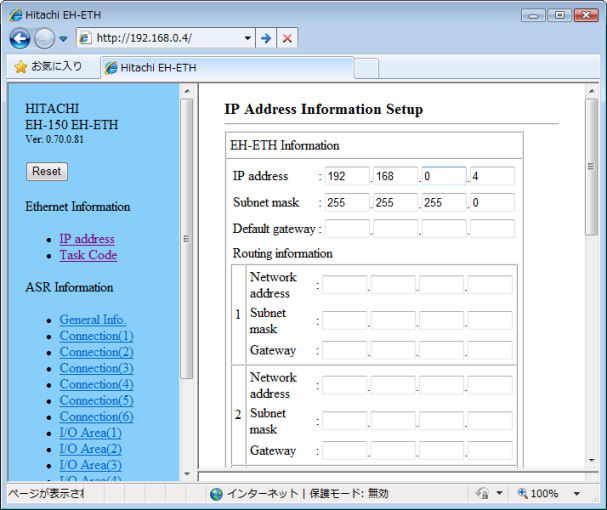
Configure basic informations such as IP address, subnet mask and gateway etc.
Explanation
- Open the edit screen by pushing "Setting" button, Configure network parameters.
- By pushing "Set" button, the configuration is stored into set up file in Ethenrnet unit. If errors occur, the information is shown at the bottom of error frame.
Port number
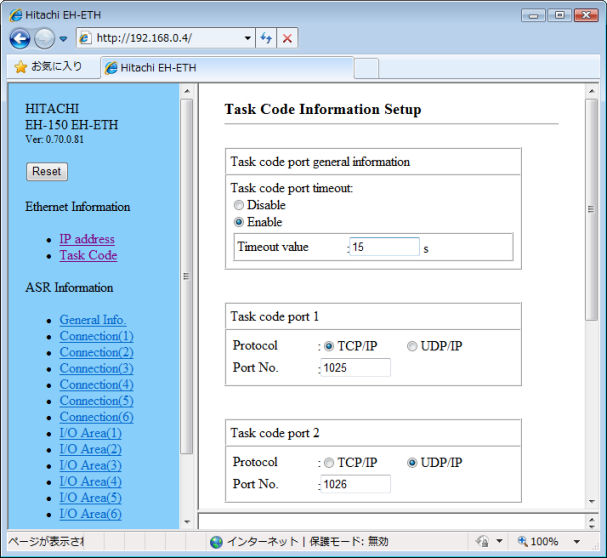
Specify the protocol and port number, and set the task code communication.
Explanation
- configure whether the observation of timeout is necessary or not , and if necessary , configure the timeout period for task code.
- Specify the protocol and port number(decimal) for task code communication. It is accessable to connect EH-150 until max 4 ports.
- By pushing "Set" button,the configuration is stored into set up file in Ethenrnet unit. If errors occur, the information is shown at the bottom of error frame.
- MITSUBISHI MELSEC
- OMRON SYSMAC
- JTEKT TOYOPUC
- YOKOGAWA FA-M3
- HITACHI HIDIC
- SHARP SATELLITE
- FUJI MICREX
- PANASONIC FP
- YASKAWA MP
- KEYENCE KV
- TOSHIBA PLC
- AZBIL CPL
- IAI CONTROLLER
- ROCKWELL AB
- SIEMENS SIMATIC
- CODESYS PLC
- GE PLC
- Saia PLC
- LSIS XGT
- MODBUS
- FANUC CNC
- MITSUBISHI CNC
- MITSUBISHI EDM
- KAWASAKI ROBOT
- YASKAWA ROBOT
- SEIKO EPSON ROBOT
- YAMAHA ROBOT
- SHIBAURA MACHINE
- Sumitomo Heavy Industries - Molding Machine
- The Japan Steel Works - Molding Machine
- DPRNT
- MTConnect
- BACnet
- EtherNet/IP
- MITSUBISHI RFID
- OMRON RFID
- JCC AE sensor
- COGNEX BCR
- KEYENCE BCR
- MARS TOHKEN BCR
- MITSUBISHI ECO
- IEC61850 MMS Client
- IEC60870-5-104
- DNP3
- OPC DA CLIENT
- OPC UA CLIENT
- OPC UA SUBSCRIBER
- ODBC CLIENT
- DDE CLIENT
- DxpLink CLIENT
- Modbus/TCP Server
- User Protocols
- SHARED MEMORY